Objective
The Nonconformities module allows users to directly register Nonconformities, enabling the problem to be analyzed and addressed. This process consists of 6 stages: details, immediate actions, root cause analysis, action plan, implementation, and effectiveness analysis.
Prerequisites:
Have the Register NCR permission enabled in your role. For more details about the permissions available in the Nonconformities module, click here.

Step-by-step:
1. To start registering a nonconformity, access the Nonconformities module and click the Register Nonconformity tab.

2. When accessing the Register Nonconformity menu, the screen for entering the nonconformity details will open. Here, we will enter all the information related to the nonconformity. The fields are:
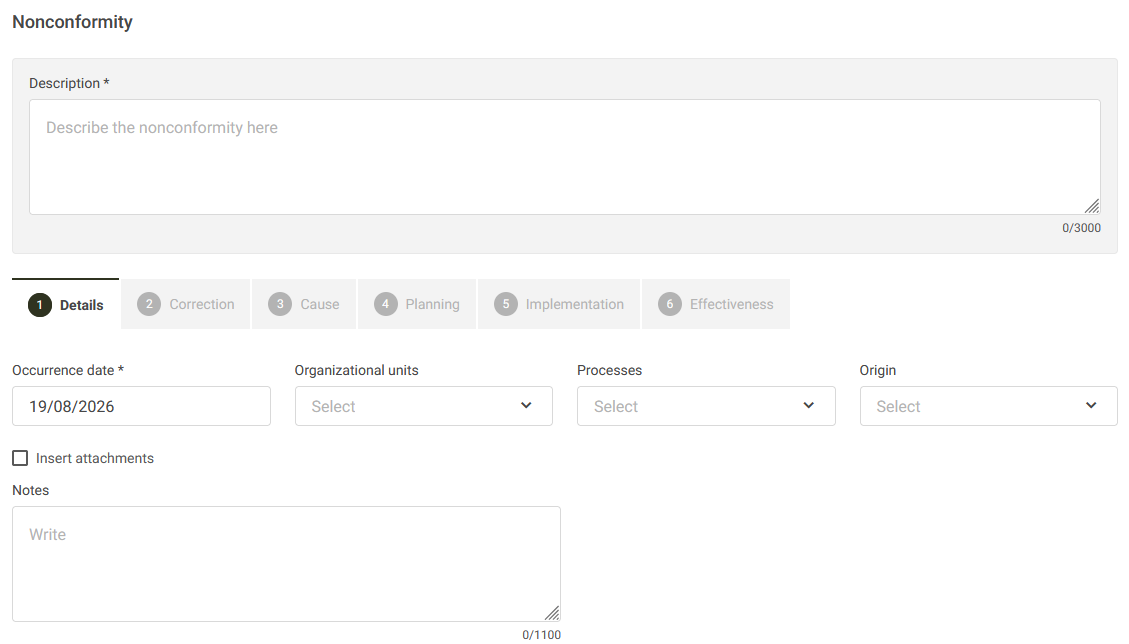
Description: Enter a description that helps identify the nonconformity.
Date of Occurrence: Enter the date on which the event that caused this nonconformity occurred.
Organizational Units: Select the units where the nonconformity was identified. For more information, click here.
Processes: Select the processes involved in this nonconformity. For more information, click here.
Source: Select the source of this nonconformity. For more information, click here.
Notes: Enter any additional information related to this nonconformity.
3. After completing the nonconformity details, the individuals responsible for each stage will be assigned:

Additional Information:
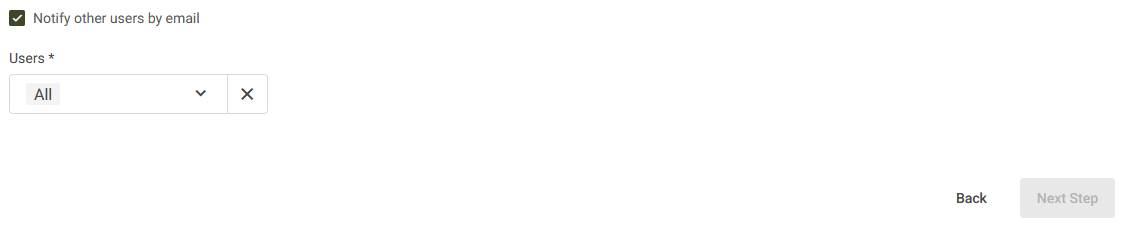
It is possible to enable the Notify other users by email option. The users selected in this field will receive an email informing them about the registration of this Nonconformity.